MessagePack-CSharp
MessagePack 是一种高效的二进制序列化格式。它允许你在像JSON这样的多种语言之间交换数据。但它更快,更小。小整数被编码成单个字节,典型的短字符串除了字符串本身外,只需要一个额外的字节。
MessagePack-CSharp是MessagePack的C#语言实现,它比MsgPack-Cli快10倍,支持LZ4压缩。本文将探索用MessagePack替代.net System.Text.Json,提高API效率。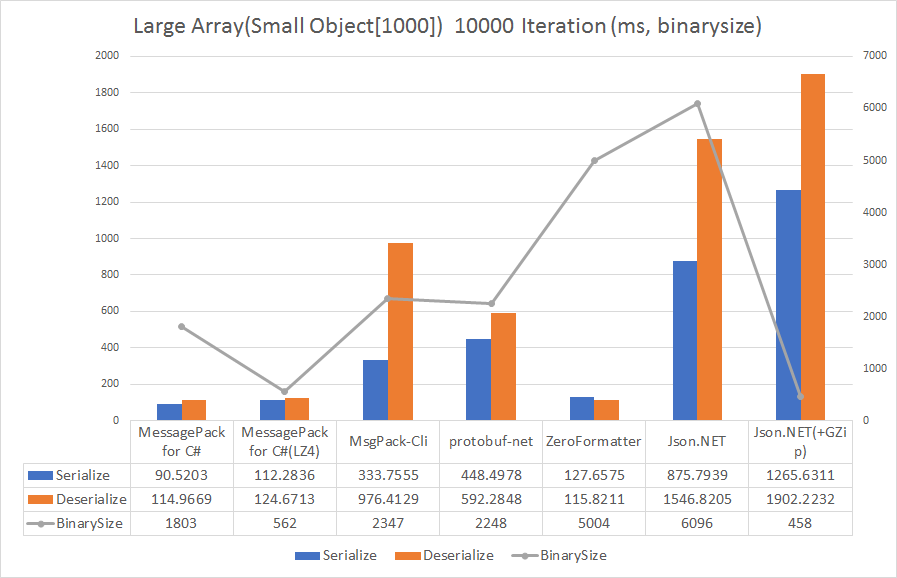
基本用法
在项目添加Messagepack
1
Install-Package MessagePack
创建测试类
1
2
3
4
5
6
7
8
9
10
11
12
13
14
15
16
17
18
19
20
21
22
23
24
25
26
27
28
29
30[]
public class MyClass2
{
[]//速度更快,序列化后数组更小
public int testInt { get; set; }
[]
public double[] testArray { get; set; }
[]
public string testStr { get; set; }
}
[]
public class MyClass
{
[]//html object友好
public int Age { get; set; }
[]
public string FirstName { get; set; }
[]
public string LastName { get; set; }
// All fields or properties that should not be serialized must be annotated with [IgnoreMember].
[]
public string FullName { get { return FirstName + LastName; } }
}说明:MessagePack序列化的对象的每一个属性都需要有Key属性进行约束。Key可以是int或者string。其中int速度更快,序列化后的二进制数组大小也会相对string更小。
string序列化后数组虽然更大,但在前端html里反序列化成object后更方便的使用。序列化及反序列化
1
2
3
4
5
6
7
8
9
10
11
12
13
14
15
16
17
using MessagePack;
static void Main(string[] args)
{
MyClass mc1 = new MyClass() { Age = 77, FirstName = "ddd", LastName = "aaa" };
byte[] bytes = MessagePackSerializer.Serialize(mc1);//序列化
var obj = MessagePackSerializer.Deserialize<MyClass>(bytes);//反序列化
MyClass2 mc2 = new MyClass2()
{
testArray = new double[] { 123.456, 2.2345, 3.31357, 4, 5.5, 6.6, 7.7,8,9,10,11,2 },
testInt = 12345,
testStr = "asdfxzcbv",
};
bytes = MessagePackSerializer.Serialize(mc2);//序列化
var obj2=MessagePackSerializer.Deserialize<MyClass2>(bytes);//反序列化
Console.WriteLine("Hello, World!");
}
服务端用MessagePack替代System.Text.Json
新建Asp.Net Core Web应用
Nuget添加MessagePack和MessagePack.AspNetCoreMvcFormatter
1
2
Install-Package MessagePack
Install-Package MessagePack.AspNetCoreMvcFormatter修改Program.cs,添加MessagePack序列化控制器支持和跨域的支持
1
2
3
4
5
6
7
8
9
10
11
12
13
14
15
16
17
18
19
20
21
22
23
24
25
26
27
28
29
30
31
32
33
34
35
36
37
using MessagePack.AspNetCoreMvcFormatter;
using MessagePack;
......
// 添加控制器支持
builder.Services.AddControllers(options =>
{
// 添加 MessagePack 输出格式化器
options.OutputFormatters.Add(new MessagePackOutputFormatter(MessagePackSerializerOptions.Standard));
// 添加 MessagePack 输入格式化器
options.InputFormatters.Add(new MessagePackInputFormatter(MessagePackSerializerOptions.Standard));
// 设置 MessagePack 为默认内容类型
options.ReturnHttpNotAcceptable = true; // 强制客户端接受 MessagePack
options.FormatterMappings.SetMediaTypeMappingForFormat("msgpack", "application/x-msgpack");
}).AddControllersAsServices();
......
// 配置 MessagePack 序列化选项(例如启用压缩)
builder.Services.Configure<MessagePackSerializerOptions>(options =>
{
options = options.WithCompression(MessagePackCompression.Lz4Block);
});
......
//配置跨域请求
builder.Services.AddCors(options =>
{
options.AddPolicy(name: "MyPolicy",
policy =>
{
policy.WithOrigins(
"https://localhost:5069",
"https://localhost:5001")
.AllowAnyOrigin().AllowAnyHeader();
});
});
......
app.UseCors("MyPolicy");//启用
app.MapControllers();新建API控制器,配置接口
1
2
3
4
5
6
7
8
9
10
11
12
13
14
15
16
17
18
19
20
21
22
23
24
25
26
[]
[]
public class TestAPIController : ControllerBase
{
MyClass mc = new MyClass
{
Age = 99,
FirstName = "hoge",
LastName = "huga",
};
//[HttpGet]
//[Consumes("application/x-msgpack")]
public MyClass GetObj4()
{
return mc;
}
public MyClass2 GetObj3()
{
MyClass2 mc2 = new MyClass2() { testArray = new double[] { 1, 2, 3, 4, 5, 6.6, 7, 8.8 }, testInt = 123, testStr = "zasdfgsdd" };
return mc2;
}
}启动程序,测试效果
1 | curl -X GET "http://localhost:5208/api/getobj3" -H "Accept: application/x-msgpack" --output 3_m.txt |
可以看到,服务端根据不同的请求返回不同的结果。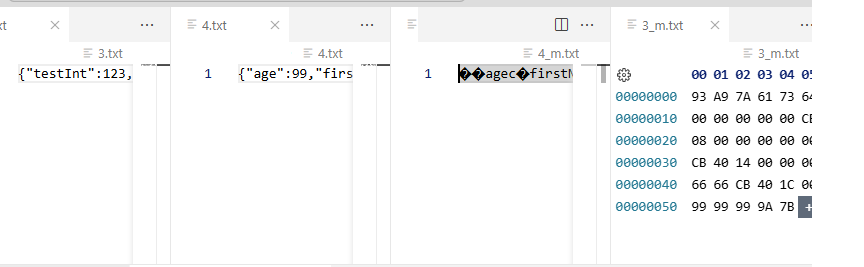
前端-Html
前端页面需要引用msgpack.min.js并且调用MessagePack.decodeAsync方法将api请求的数据进行反序列化。
关键代码如下:
1 |
|
运行程序,查看浏览器控制台输出(变量键值如果是字符串,那么在html下反序列化后得到的object可以很方便的使用。反之反序列化后得到的是一个数组,用起来相对麻烦一些)。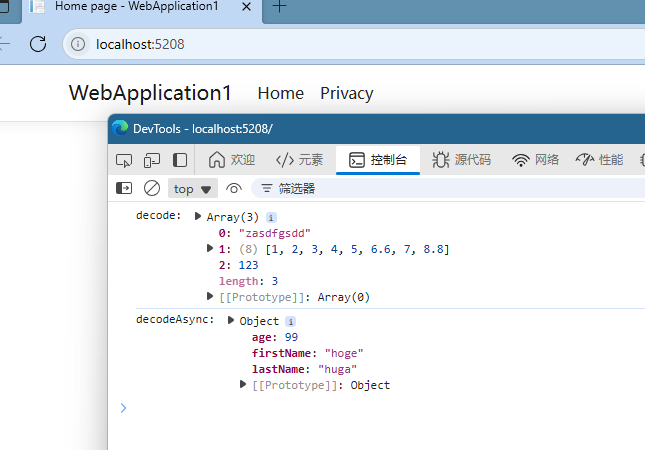
前端-Blazor
- 新建”Blazor WebAssembly独立应用”,并添加MessagePack的Nuget引用。
- 检查Program.cs 添加HttpClient支持
Program.cs 1
builder.Services.AddScoped(sp => new HttpClient { BaseAddress = new Uri(builder.HostEnvironment.BaseAddress) });
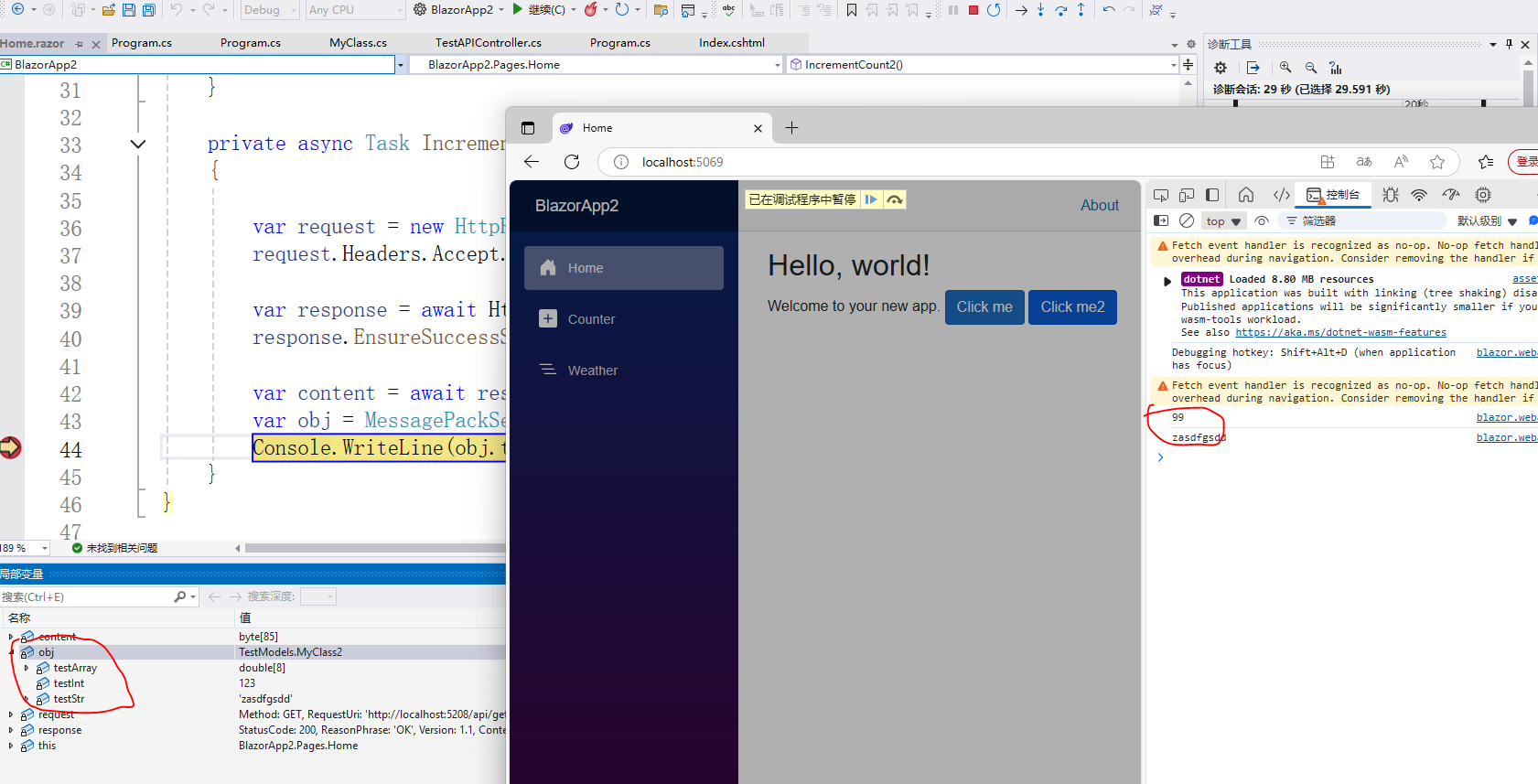
- 编辑Home.razor,添加测试代码运行服务端程序和Blazor程序,点击Home页面下的按钮并在断点以及控制台查看效果。
Home.razor 1
2
3
4
5
6
7
8
9
10
11
12
13
14
15
16
17
18
19
20
21
22
23
24
25
26
27
28
29
30
31
32
33
34
35
36
37
38
39
40
41
42
43
44
45
46
47
48
@page "/"
@using System.Net.Http.Headers
@using MessagePack
@using TestModels
@inject HttpClient Http

<PageTitle>Home</PageTitle>

<h1>Hello, world!</h1>

Welcome to your new app.

<button class="btn btn-primary" @onclick="IncrementCount">Click me</button>

<button class="btn btn-primary" @onclick="IncrementCount2">Click me2</button>


@code {
    private async Task IncrementCount()
    {

        var request = new HttpRequestMessage(HttpMethod.Get, "http://localhost:5208/api/getobj4");
        request.Headers.Accept.Add(new MediaTypeWithQualityHeaderValue("application/x-msgpack"));

        var response = await Http.SendAsync(request);
        response.EnsureSuccessStatusCode();

        var content = await response.Content.ReadAsByteArrayAsync();
        var obj = MessagePackSerializer.Deserialize<MyClass>(content, MessagePackSerializerOptions.Standard);
        Console.WriteLine(obj.Age);
    }

    private async Task IncrementCount2()
    {

        var request = new HttpRequestMessage(HttpMethod.Get, "http://localhost:5208/api/getobj3");
        request.Headers.Accept.Add(new MediaTypeWithQualityHeaderValue("application/x-msgpack"));

        var response = await Http.SendAsync(request);
        response.EnsureSuccessStatusCode();

        var content = await response.Content.ReadAsByteArrayAsync();
        var obj = MessagePackSerializer.Deserialize<MyClass2>(content, MessagePackSerializerOptions.Standard);
        Console.WriteLine(obj.testStr);
    }
}