C# 引用C/C++ DLL的几种方式(windows篇)
这篇文章通过一个简单的例子,介绍了如何创建C dll并且被C#程序调用。
x64的C#程序引用x86的C DLL会报错
x86的C#程序引用x64的C DLL会报错
一、准备
创建一个C DLL
在visual studio创建一个c++空项目,项目名称CDll
向头文件目录添加test.h,向源文件目录添加test.c
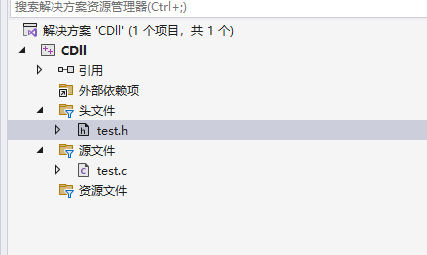
编辑test.h和test.c
test.h 1
_declspec(dllexport) int Add(int a, int b);
test.c 1
2
3
4
5
6
int Add(int a, int b)
{
return a + b;
}修改工程属性 常规——配置类型为动态库(.dll)
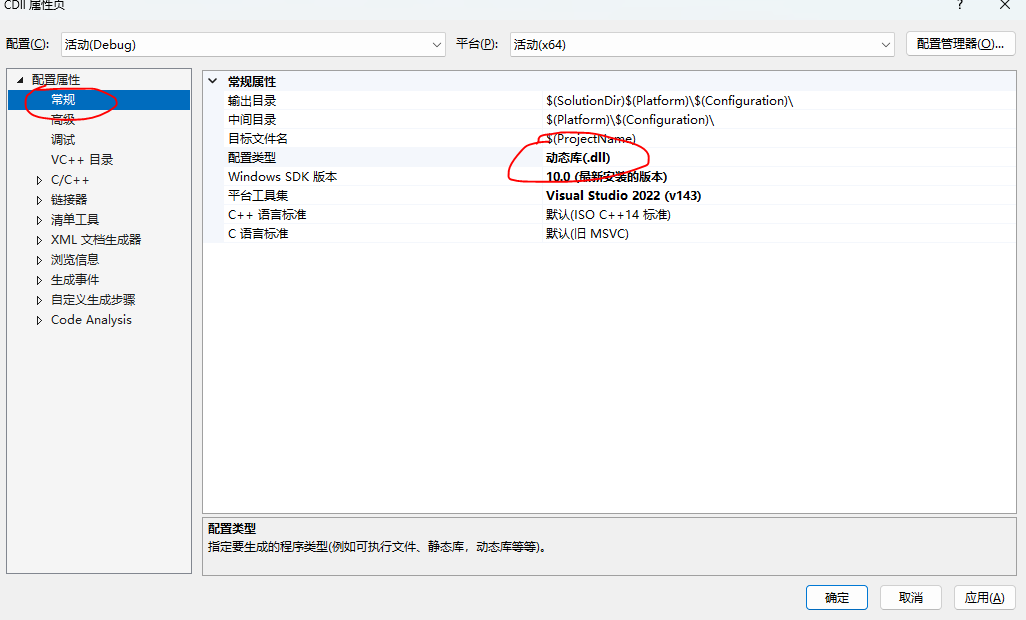
编译,生成CDll.dll
创建一个C#控制台程序,并调用CDll.dll
这里C#控制台程序环境选择.net8,名称为’CSharpTest’。
编译这个项目,让visual studio自动生成debug目录,并将前面的CDll.dll复制到控制台Debug可执行程序所在目录下
二、通过DllImport直接调用
介绍
官方参考链接:
https://learn.microsoft.com/zh-cn/dotnet/api/system.runtime.interopservices.dllimportattribute
| 字段 | 介绍 |
|---|---|
| BestFitMapping | 将 Unicode 字符转换为 ANSI 字符时,启用或禁用最佳映射行为 |
| CallingConvention | 指示入口点的调用约定。 |
| CharSet | 指示如何向方法封送字符串参数,并控制名称重整。 |
| EntryPoint | 指示要调用的 DLL 入口点的名称或序号。 |
| ExactSpelling | 控制 CharSet 字段是否使公共语言运行时在非托管 DLL 中搜索入口点名称,而不使用指定的入口点名称。 |
| PreserveSig | 指示是否直接转换具有 HRESULT 返回值的非托管方法,或者是否 HRESULT 自动将返回值转换为异常。 |
| SetLastError | 指示在从特性化方法返回之前,被调用方是在 Windows 上还是在 errno(的其他平台上设置错误 SetLastError) |
| ThrowOnUnmappableChar | 启用或禁用在遇到已被转换为 ANSI“?”字符的无法映射的 Unicode 字符时引发异常。 |
使用
- 创建DL1.cs并使用DllImport直接调用
DL1.cs 1
2
3
4
5
6
7
8
9
10
11
12
13
14
15
16
17
18using System.Runtime.InteropServices;
namespace CSharpTest
{
public class DL1
{
[]
private static extern int Add(int a, int b);
public static void TestDllImport()
{
int res = Add(5, 6);
Console.WriteLine(res);
}
}
} - 在Main函数中引用TestDllImport()方法,执行程序并检验结果
Program.cs 1
2
3
4
5static void Main(string[] args)
{
DL1.TestDllImport();
Console.WriteLine("Hello, World!");
}
三、通过kernel32动态加载
该方法通过DllImport加载kernel32,并使用其提供的方法来实现对C/C++ DLL的动态加载、调用、卸载等功能。
介绍
官方参考链接:
https://learn.microsoft.com/zh-cn/windows/win32/api/libloaderapi/
| 方法 | 介绍 |
|---|---|
| LoadLibrary | 将指定的模块加载到调用进程的地址空间中。 指定的模块可能会导致加载其他模块。 |
| FreeLibrary | 释放加载的动态链接库 (DLL) 模块,并在必要时递减其引用计数。 当引用计数达到零时,模块将从调用进程的地址空间中卸载,句柄不再有效。 |
| GetProcAddress | 从指定的动态链接库 (DLL) 检索导出函数 (也称为过程) 或变量的地址。 |
使用
创建DL2.cs,写入以下代码
DL2.cs 1
2
3
4
5
6
7
8
9
10
11
12
13
14
15
16
17
18
19
20
21
22
23
24
25
26
27
28
29
30
31
32
33using System.Runtime.InteropServices;
namespace CSharpTest
{
public class DL2
{
[
]
private static extern IntPtr WindowsLoadLibrary(string dllPath);
[
]
private static extern bool WindowsFreeLibrary(IntPtr handle);
[
]
private static extern IntPtr WindowsGetProcAddress(IntPtr handle, string procedureName);
[]
public delegate int tAdd(int a, int b);
public static void TestDllImport()
{
var ptr = WindowsLoadLibrary("CDll.dll");
var ptr_Add = WindowsGetProcAddress(ptr, "Add");
tAdd add = (tAdd)Marshal.GetDelegateForFunctionPointer(ptr_Add, typeof(tAdd));
int res2 = add.Invoke(3, 4);
Console.WriteLine(res2);
WindowsFreeLibrary(ptr);
}
}
}在Main函数中引用DL2.TestDllImport()方法,执行程序并检验结果
Program.cs 1
2
3
4
5
6static void Main(string[] args)
{
DL2.TestDllImport();
DL1.TestDllImport();
Console.WriteLine("Hello, World!");
}